



Examples of Usecase
ZTRUS AI-OCR is built to solve real operational challenges across finance, accounting, and sales processes. Below are practical use cases that demonstrate how our technology automates document processing, validates business logic, and seamlessly integrates with your ERP system.
3-Way Matching (Accounts Payable Automation)
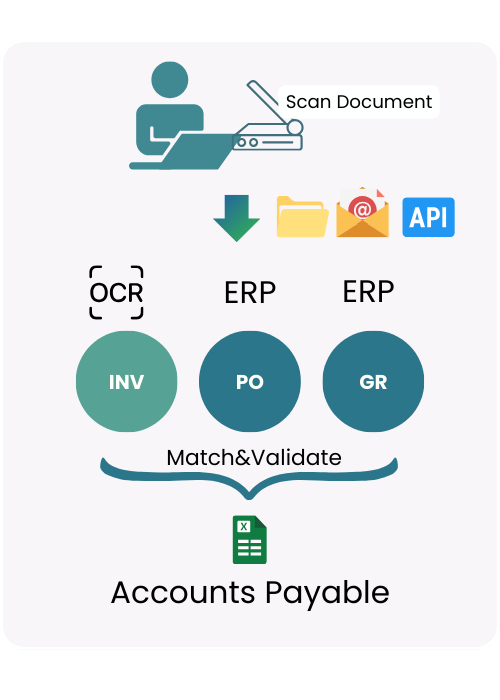
ZTRUS AI-OCR automates the full 3-way matching process between Invoice (INV), Purchase Order (PO), and Goods Receipt (GR) inside your ERP system. This use case is designed for finance and accounting teams who want to eliminate manual verification, reduce errors, and accelerate Accounts Payable operations.
Step-by-Step Workflow
Step 1: Receipt & Document Submission
User upload receipts via: Web application / Share Folder / Email. Supports Jpg, PDF, Png
Step 2: AI-OCR Data Extraction
AI-OCR extracts structured data such as: (Invoice No, PO No., Date, Supplier Detail, Total Amount, Item detail) The AI model understands table structures and multi-line item formats.
Step 3: Data Standardization & Validation
Extracted data is normalized into a structured format. ZTRUS maps fields with ERP Data Master: Vendor Master, Item Master, Etc.), Business logic validation is applied Required fields check (Duplicate invoice detection, Tax calculation validation)
Step 4: 3-Way Matching Logic
ZTRUS automatically matches (INV No., PO No., Vendor detail, Amount, Etc. Validation rules include (Quantity tolerance check / Price tolerance check / Total amount comparison) ✔ If matched → Automatically approved or ready for posting. ✘ If mismatched → Flagged for review with clear discrepancy details.
Step 5: ERP Integration
Data is pushed into ERP via API, System creates or prepares: (AP Invoice, Matching reference document), Export formats: JSON, CSV, Excel, or direct ERP API.
Business Value
- Reduce manual checking time by 70–90%
- Prevent overpayment and duplicate invoices
- Improve compliance and audit traceability
- Accelerate closing cycle
PO to SO (Purchase Order to Sales Order Automation)
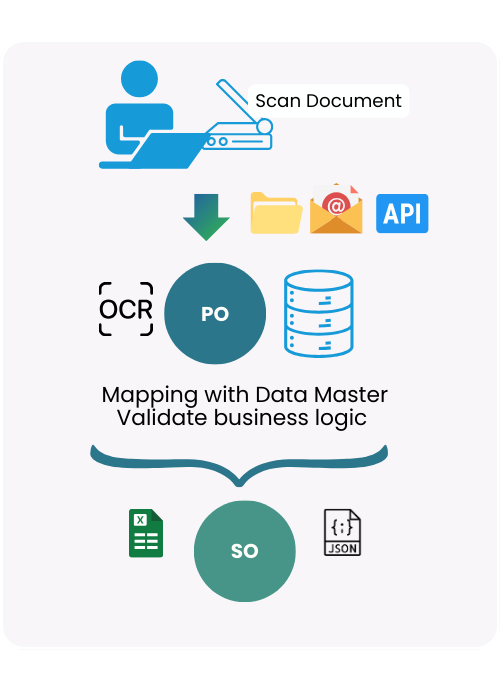
ZTRUS AI-OCR automates the process of converting customer Purchase Orders (PO) into structured Sales Orders (SO) inside ERP systems. This is ideal for companies receiving POs in various formats from modern trade, distributors, or B2B customers.
Step-by-Step Workflow
Step 1: Customer PO Intake
Customer sends PO via email, EDI alternative, upload portal, or API. Supports Jpg, PDF, Png
Step 2: AI-OCR Data Extraction
AI-OCR extracts structured data such as: (Customer Name, Po No., Date, Delivery Date, Ship to detail, Line Item,, Total) The system can interpret (Different PO layouts per customer / Multi-line and nested tables / Complex discount structures)
Step 3: Data Master Mapping
Extracted data is matched against (Customer Master / Item Master, Price List, Ship to detail) If new SKU or unmatched item → Flag for review.
Step 4: Business Logic Validation
The system validates (Correct price vs master price list, Discount logic, Minimum order quantity, Customer-specific logic)
Step 5: Automatic Sales Order Creation
Once validated: SO draft is automatically created in ERP. Data is sent via API or structured file. Sales team only reviews exceptions instead of manual entry.
Business Value
- Eliminate manual SO key-in
- Reduce order processing errors
- Faster order confirmation
- Support high-volume B2B environments
- Improve customer satisfaction
Expense Process Automation
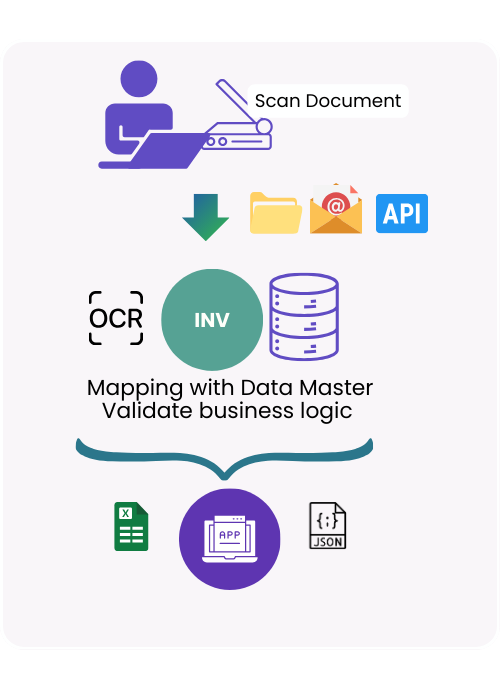
ZTRUS AI-OCR streamlines the employee expense reimbursement process by extracting data from receipts and invoices, validating them against company policies, and preparing them for ERP posting.
Step-by-Step Workflow
Step 1: Receipt & Document Submission
Employees upload receipts via (Web application / Mobile upload / Email submission / Share Folder) Supports Jpg, PDF, Png
Step 2: AI-OCR Data Extraction
AI-OCR extracts structured data such as: (Invoice No, Date, Vendor Detail, Total Amount, Line Item) The system can interpret (Different PO layouts per customer / Multi-line and nested tables / Complex discount structures)
Step 3: Mapping with Data Master
Extracted data is validated against (Expense Category Master / Cost Center / Department / Employee ID / Vendor database)
Step 4: Business Rule Validation
The system automatically checks (Policy compliance (amount limits, claim types) / Duplicate submission detection / Date validity / VAT logic validation) ✔ If compliant → Ready for approval workflow. ✘ If not → Flagged with specific reasons.
Step 5: Workflow & ERP Posting
Expense request flows through approval hierarchy. Upon approval, the system: Creates accounting entries Prepares AP posting Exports structured data (Excel, JSON, API)
Business Value
- Faster reimbursement cycle
- Reduce fraud and duplicate claims
- Ensure policy compliance
- Improve finance visibility
Consult with Our Experts
Our team is available to offer comprehensive consultation on AI-powered OCR solutions, including functionality, integration options, pricing structures, and other related aspects.